Install the NovelOS Studio Skills
Before you start: Connect your AI tool
Your tool can already read your book. The Skills teach it to behave like an editor while it does: quote what it means, cite where, and ask before saving anything.
Download them
In Settings › MCP › Set up, step 3 is Add skills. Click All skills (.zip). NovelOS opens a save dialog in your Downloads folder and tells you where the file went. The file is called novelos-skills- followed by the app version.
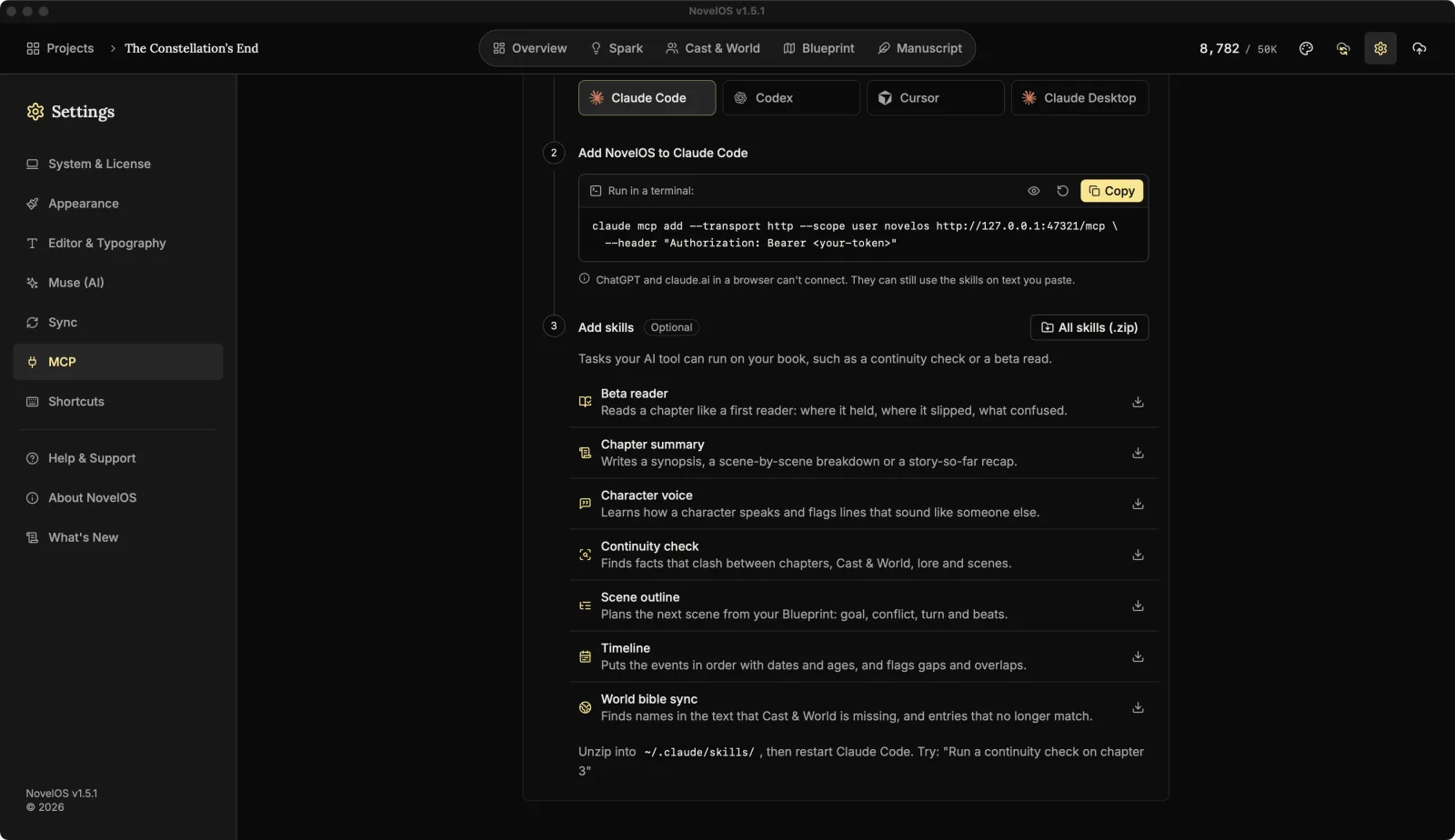
The zip holds one folder per skill: novelos-beta-reader, novelos-chapter-summary, novelos-character-voice, novelos-continuity-check, novelos-scene-outline, novelos-timeline-builder and novelos-world-bible-sync. Each has a single SKILL.md inside, which is plain text you can read if you're curious what your tool is being told.
Put them where your tool looks
| Tool | Skills folder |
|---|---|
| Claude Code | ~/.claude/skills/ |
| Codex | ~/.agents/skills/ |
| Cursor | ~/.cursor/skills/ |
~ is your home folder. Folders that start with a dot are hidden in Finder, which is why the terminal is the easier route. For Claude Code on a Mac, in Terminal:
mkdir -p ~/.claude/skills
unzip ~/Downloads/novelos-skills-*.zip -d ~/.claude/skills/
The first line makes the folder if it isn't there yet; the second unzips the skills into it. For Codex or Cursor, swap in that tool's folder. Then restart the tool: in Claude Code, type /exit and start claude again.
Claude Desktop takes skills one at a time in claude.ai › Settings › Capabilities. Use the download button next to each skill in NovelOS, which saves that skill as its own .zip, and upload them one by one. See Skills for AI tools.
Call a skill
You don't have to name a skill. Ask for the job in your own words and the tool picks the matching one from its description:
Run a continuity check on chapter 3
In Claude Code you can also call one by name, which is handy when you want to be sure:
/novelos-continuity-check 3Which skill when
| Skill | Use it | Can save, after you agree |
|---|---|---|
| Scene outline | Stuck on what happens next. | A scene card, or a comment on the last paragraph. |
| Timeline | Lost track of days, ages or flashbacks. | A card on a Timeline Spark board, comments, a scene's time. |
| Character voice | A character sounds off, or two sound alike. | Comments, a Spark card with the profile, the character entry. |
| Chapter summary | You need a recap or a synopsis. | A comment on the chapter, or a Spark card. |
| Continuity check | Before a revision pass. | Comments, and fixes to records that are wrong. |
| World bible sync | Cast & World has fallen behind the draft. | New or updated characters, places and lore. |
| Beta reader | You want a reader's reaction. | Comments, and a summary card on a Beta read Spark board. |
None of the seven edits your chapter text. The next three pages use them in the order a book needs them.
Next: Session one: plan scenes and timeline
Checked against NovelOS Studio 1.5.1 · Updated · View as Markdown