Review and undo AI changes
Before you start: Session three: continuity, world, beta read
After a session, spend a minute in Settings › MCP › Activity. It's the one place that shows everything a tool did, and the one place to take it back.
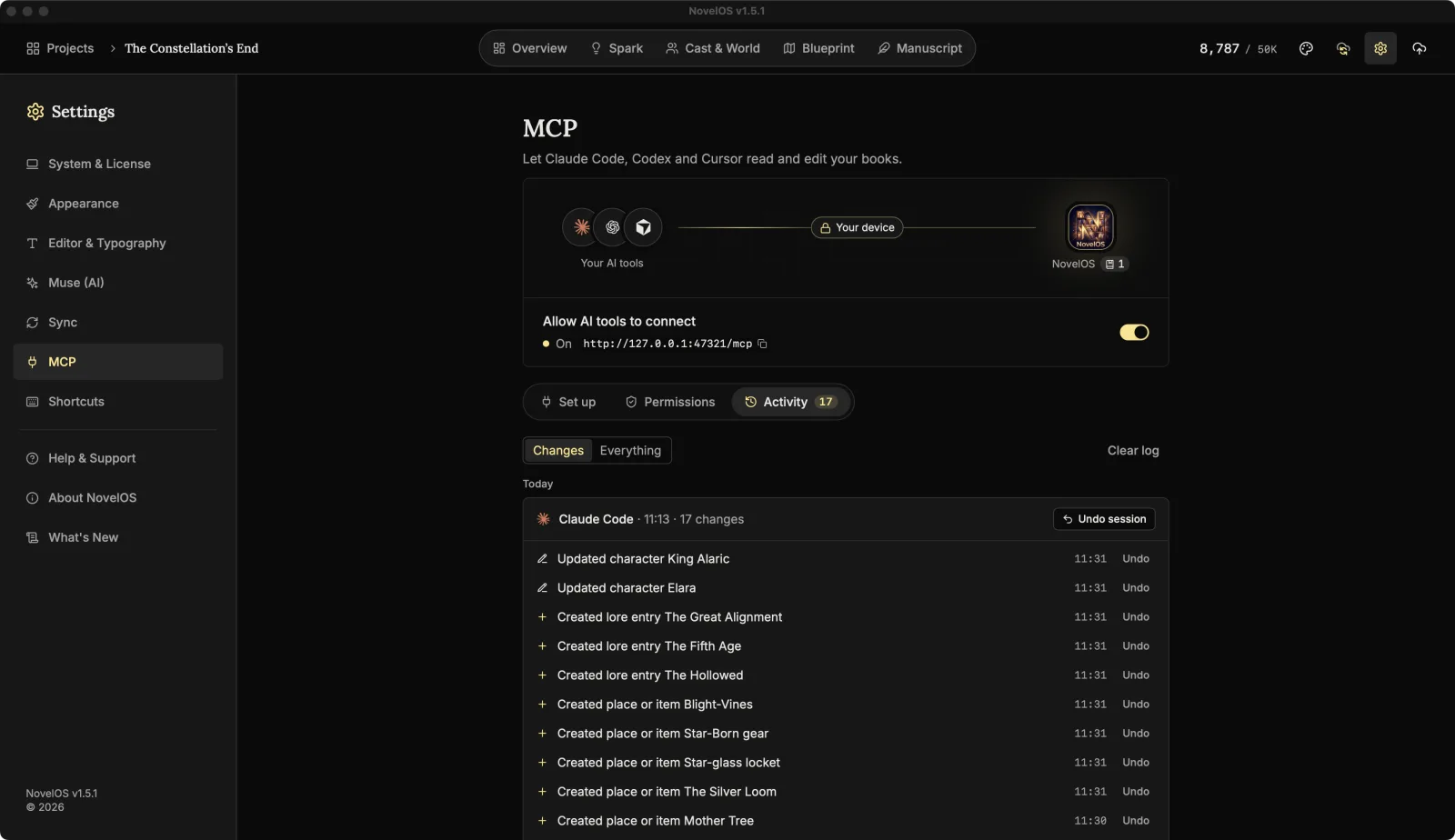
Read the log
The tab shows a count of changes you haven't undone yet, so you can tell from the tab alone whether a tool has been busy.
Entries are newest first, grouped by day (Today, Yesterday, then the date) and then by session. A session, to NovelOS, is everything one tool did between opening and quitting the app. It's headed by the tool's name, when it started and how many changes it made. That's not the same as the writing sessions in this series: if NovelOS stayed open all week, a week of Claude Code is one session.
Each line says what happened in plain words, with the time:
- "Created scene The Crossing"
- "Commented on The Ferry, paragraph 12"
- "Updated character Mara"
- "Edited The Ferry from paragraph 12"
Changes shows only edits. Everything adds every read, which is how you check what a tool looked at before it told you something. A long list shows about the 40 newest entries; Show all lists the rest.
Undo
- Undo on a line puts that one change back. The line is crossed out and marked Undone.
- Undo session undoes every change in that session, newest first.
- Undo all changes shows up when more than one session has changes left, and undoes all of them.
Undo works on whatever the change was: a comment is removed, a created scene or entry is deleted, an updated character goes back to how it was, a deleted chapter comes back.
One catch with chapter text
Undoing an edit to a chapter's text puts the whole chapter back as it was just before that edit. Anything written in that chapter since, by the tool or by you, goes with it. So:
- Undo text edits soon, before you've written more in that chapter.
- When there are several edits to one chapter, undo from the newest down.
- If you've already written more, use the snapshot instead (below) and copy back what you need.
The Before AI edit snapshot
The first time a tool changes a chapter's text in a session, NovelOS saves a snapshot of the chapter first (unless the chapter was empty), named "Before AI edit" with the tool's name, for example "Before AI edit (Claude Code)". That covers replacing or inserting paragraphs, replacing the whole chapter and restyling a paragraph. Renaming or moving a chapter, comments and Cast & World changes don't make one; undo covers those.
Open the chapter's snapshots to compare that version with the chapter now, word by word, and restore it if you want. Restoring saves the current text as a snapshot first, if it isn't saved already, so you can change your mind again. The snapshot stays even after you clear the log.
Clear the log
Clear log empties the list. It doesn't undo anything, and once the log is gone those changes can't be undone from here, so review first. The log keeps the newest 500 entries on its own. It's stored on this computer only: it doesn't sync and isn't in .novelos files.
A habit worth having
At the end of each session, open Activity, switch to Changes, read the lines and undo what you didn't mean. It's quicker than finding out three chapters later.
For every setting on this tab, see Permissions and activity.
Next: Muse or an outside agent?
Checked against NovelOS Studio 1.5.1 · Updated · View as Markdown