Connect an AI provider
Muse doesn't come with an AI of its own. You bring a key from Gemini or OpenAI (or both), and Muse uses it. Open Settings › Muse (AI). The page is called Muse Configuration and opens on the Providers tab.
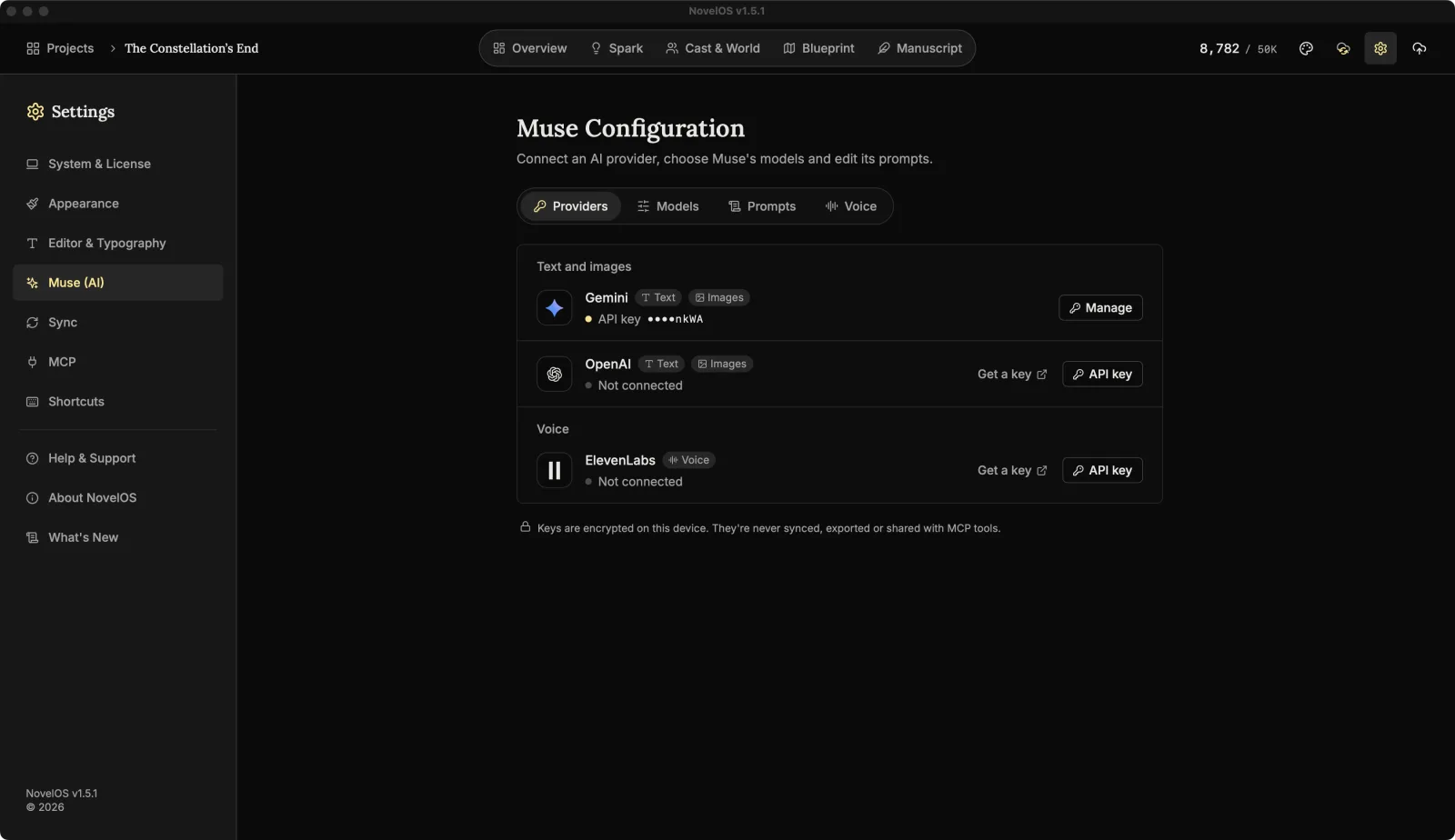
The providers
The Providers tab has two groups.
Text and images powers Muse: suggestions, rewrites, outlines, covers, portraits and maps.
| Provider | Does | Where to get a key |
|---|---|---|
| Gemini | Text and images | Google AI Studio |
| OpenAI | Text and images | The OpenAI dashboard |
Voice is for narration only.
| Provider | Does | Where to get a key |
|---|---|---|
| ElevenLabs | Voice, for Read Aloud and audiobooks | ElevenLabs account settings |
One Muse key is enough. With both, Muse has a second provider to fall back on (see Models). A small dot on the Providers tab means neither Gemini nor OpenAI has a key yet.
Add a key
- Click Get a key on the provider's row. It opens the provider's key page in your browser. Make a key there and copy it.
- Back in NovelOS, click API key on the same row.
- Paste the key into the field and click Save. The eye button shows the key if you want to check what you pasted.
NovelOS checks the key with the provider before saving it. It asks for something free, like the list of models, so the check doesn't spend credit. While it runs the button reads Checking…. When it's done the row says API key followed by the last four characters, like ••••1a2b. That's the only part of the key you'll ever see again.
Press Esc or click Cancel to close the field without saving.
Change or remove a key
Once a key is saved, the row's button reads Manage. It opens:
- Replace key: paste a new one. It's checked the same way before it replaces the old one.
- Remove: asks first. Muse stops using that provider until you add a key again. Click Keep if you change your mind.
Where keys are kept
Keys are encrypted on this device. They're never synced, never written into exported .novelos files and never shared with AI tools. The encryption key and the encrypted keys are stored in different places, so a copied database or a synced folder never holds both halves.
That also means each computer needs its own key. Paste the same key again on your other machine.
Older versions kept keys in the macOS Keychain. The first time a newer version needs a key it moves it over and erases the old copy, which may make macOS ask for your password one last time.
When a key won't save
| You see | What it means |
|---|---|
| Paste a key first. | The field was empty. |
| Gemini didn't accept this key. Check it and try again. | The provider refused it. Usually a missing character at either end, or a key that was deleted. |
| This key works, but the OpenAI account has no credit left. | The key is real; the account needs billing or credit. |
| Couldn't reach Gemini. Check your connection. The key wasn't saved. | No internet, or the provider didn't answer within 10 seconds. |
| OpenAI sent an unexpected answer. Try again in a moment. | Anything else. Often a hiccup on the provider's side. |
The provider's name in each message is whichever one you were saving.
Errors while Muse is working
These show up later, when you use a Muse feature:
| You see | What to do |
|---|---|
| The Muse has no API key yet. Add one in Settings. | Add a Gemini or OpenAI key on the Providers tab. |
| Gemini refused this API key. Enter it again in Settings > Muse. | The key was revoked or changed. Use Manage › Replace key. |
| This OpenAI key is out of credit. Add credit under Billing in the OpenAI dashboard. | Top up the OpenAI account. |
| This Gemini key has no usage left. Check billing for it in Google AI Studio. | Check the key's billing in Google AI Studio. |
| OpenAI is limiting requests from this key. Wait a minute and try again. | A rate limit. Wait. |
| This Gemini key has reached its rate or usage limit. Wait a moment or check its quota in Google AI Studio. | A rate or usage limit. Wait, or raise the quota. |
| Gemini is temporarily unavailable. Try again shortly. | The provider is down or busy. |
| Could not reach OpenAI. Check your connection and try again. | You're offline. |
| The image model did not return an image. Try again. | It happens. Try again. |
When Muse tries both providers and both fail, the message names each one, so you can tell "Gemini is rate limited" from "OpenAI has no credit".
In the trial
The page shows AI features are part of the full version. Your trial includes everything else. See Trial and licence.
Related
Checked against NovelOS Studio 1.5.1 · Updated · View as Markdown