Models, quality and creativity
The Models tab in Settings › Muse (AI) decides how Muse writes. You don't pick model names; you pick a provider and a quality level, and NovelOS picks the model. Changes apply to the next thing Muse makes.
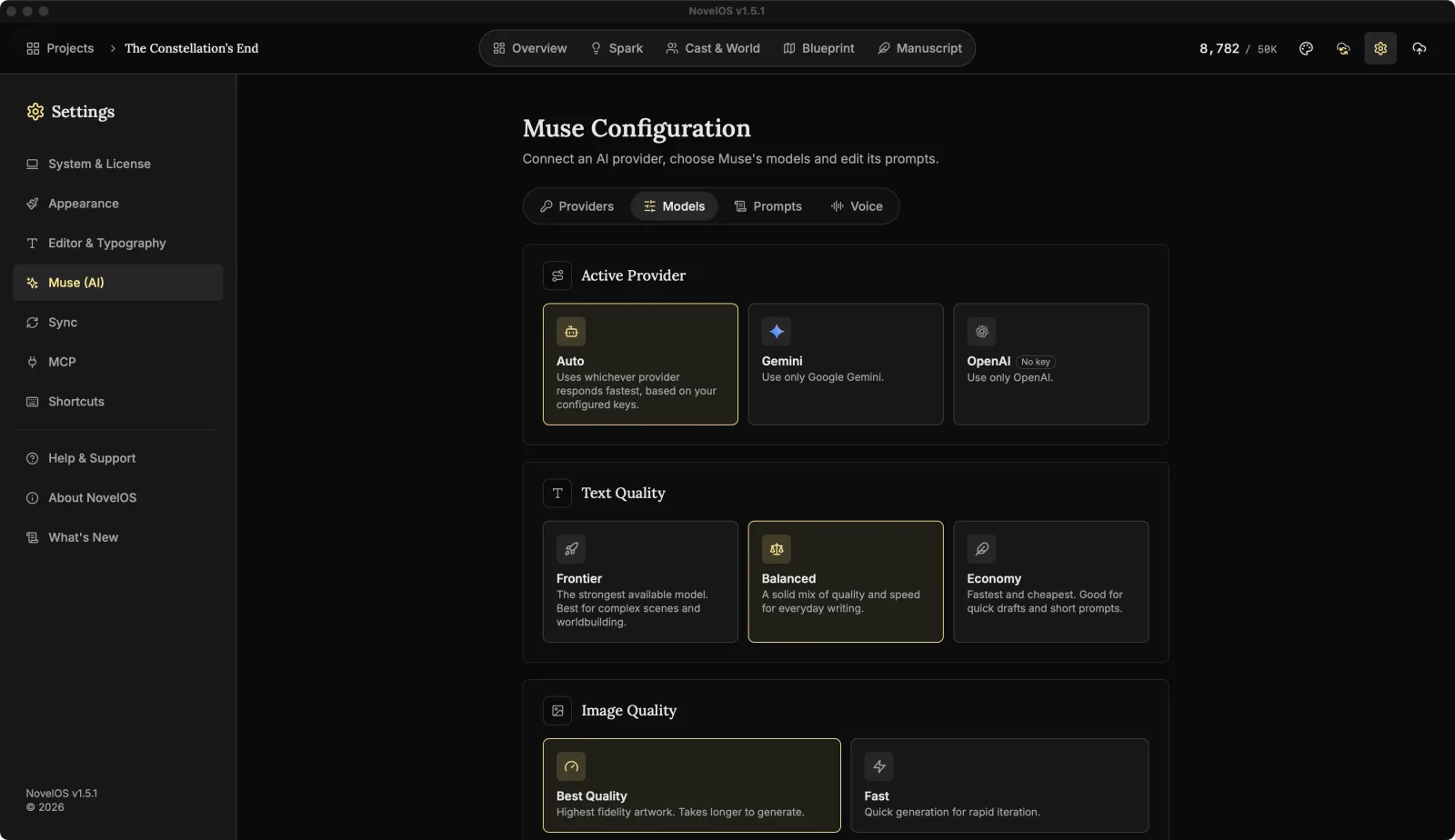
Active Provider
- Auto (the default) uses whichever providers have a key. It tries Gemini first and, if that request fails, tries OpenAI. With only one key, it simply uses that one.
- Gemini: Use only Google Gemini.
- OpenAI: Use only OpenAI.
Picking one provider means no fallback: if it fails, you see why, and Muse doesn't quietly switch to the other. A provider without a key shows No key, and choosing it just reminds you to add one on the Providers tab.
Text Quality
For suggestions, rewrites, outlines and anything else made of words.
| Option | What it's for |
|---|---|
| Frontier | The strongest available model. Best for complex scenes and worldbuilding. |
| Balanced (the default) | A solid mix of quality and speed for everyday writing. |
| Economy | Fastest and cheapest. Good for quick drafts and short prompts. |
Image Quality
For covers, portraits, concept art, idea-board pictures and maps.
| Option | What it's for |
|---|---|
| Best Quality (the default) | Highest fidelity artwork. Takes longer to generate. |
| Fast | Quick generation for rapid iteration. |
With OpenAI, both settings use the same image model, so this choice only makes a difference with Gemini.
Creativity (Temperature)
The slider runs from 0 to 1 in steps of 0.1, and the current value shows beside the heading. Lower is more predictable, higher is more surprising. It starts at 0.8.
The three shortcuts under the slider set it in one click: Precise (0.2), Balanced (0.5) and Creative (0.9).
If Muse keeps handing you the obvious idea, nudge it up. If it starts inventing a sixth moon for a planet that has one, nudge it down.
The Voice tab
The Voice tab is about narration, not Muse. Under Voice engine there are two cards, and the one you're using is marked In use:
- On this device: private and free. Works offline, with English voices.
- ElevenLabs: your ElevenLabs voices, in many languages, on your account. Without a key the card shows Connect in Providers, which takes you to the Providers tab. With one it shows Key saved.
Below the cards are the Read Aloud settings: the voice list, samples and speed. Read Aloud explains those.
Related
Checked against NovelOS Studio 1.5.1 · Updated · View as Markdown