Read Aloud and Bionic Reading
Hearing your own sentences read back is the fastest way to find the ones that trip. NovelOS reads a chapter out loud in Read mode, highlighting each sentence as it goes, and the voice runs on your computer for free.
Turn it on
- Open Settings › Editor & Typography and find Read Aloud.
- Switch on Chapter narration.
- Pick a Narrator voice and a speed (see below).
Then open a chapter, switch to Read mode (⇧ ⌘ R, or Switch Write / Read in the command palette) and a small player appears at the bottom of the page.
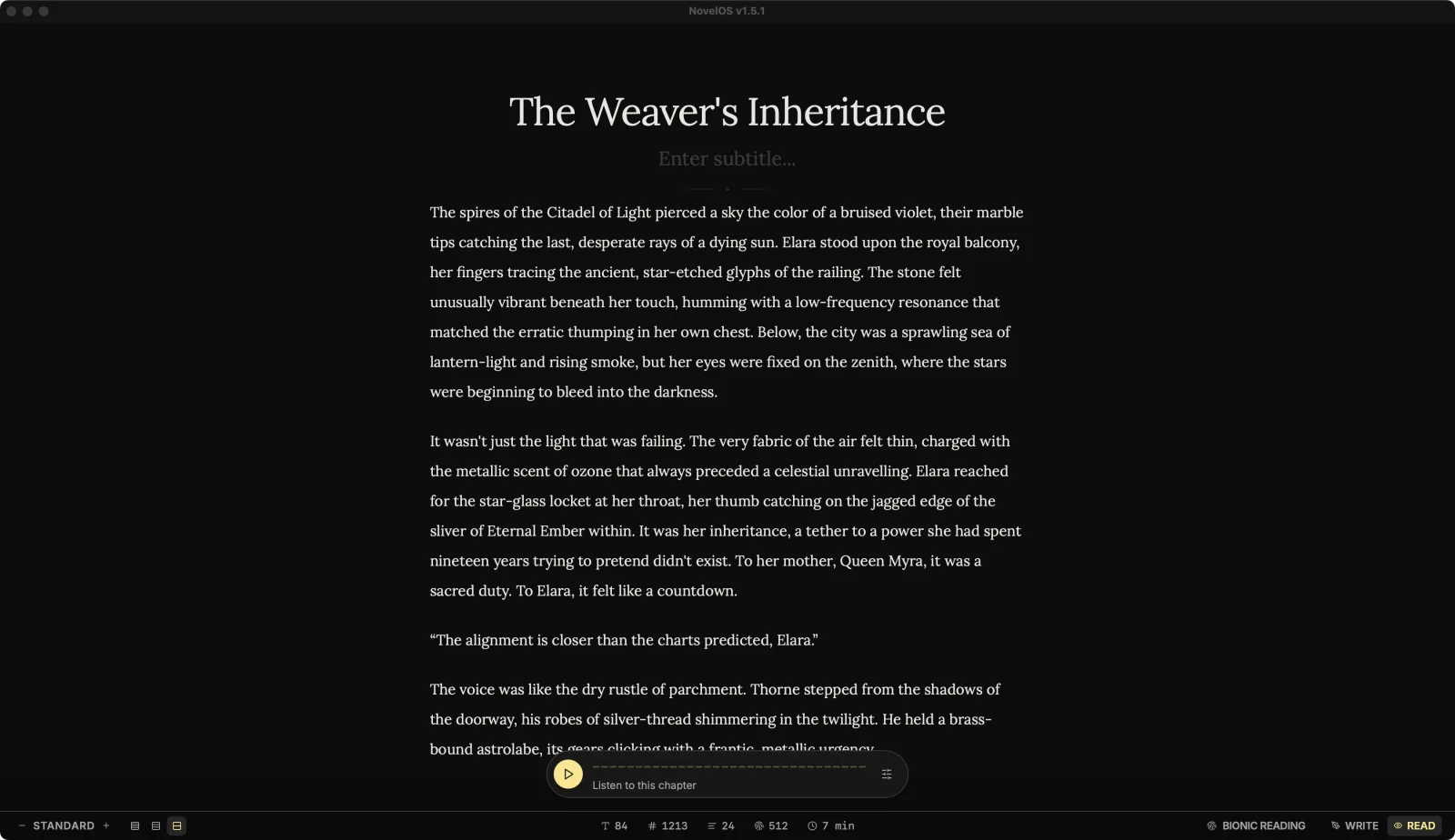
The player
- Play, Pause and Resume do what they say. The chapter title and subtitle are read first, with a pause before the opening line.
- The line under the waveform says what's happening: Loading voice…, Downloading voice… 40%, Synthesizing first passage…, then Reading aloud with how far through the chapter it is.
- Voice and speed (the sliders button) changes the narrator without leaving the page.
- Stop narration (the ×) ends it.
The sentence being read is highlighted and the rest of the chapter dims, so your eyes can follow. Moving to another chapter stops the narration, because hearing chapter 3 while looking at chapter 9 helps nobody.
If the reader runs ahead of the voice it says Catching up… or Buffering ahead… and carries on by itself.
Two voice engines
Choose the engine under Engine in Settings › Editor & Typography, or under Voice engine in Settings › Muse (AI) › Voice.
| Engine | What it costs | Languages |
|---|---|---|
| On-device (On this device) | Free. Nothing is uploaded. | English only |
| ElevenLabs | Your own ElevenLabs account pays for the characters. | Many languages |
On-device voices download once on first use (about 90 MB) and then work offline. They only read English, because the voice model only knows English pronunciation; on a book in another language they'd produce confident gibberish. Set the book's language in Overview.
ElevenLabs uses your own key and lists the voices on your ElevenLabs account. Add the key under Settings › Muse (AI) › Providers, or click Add key (or Connect in Providers) where NovelOS asks for it. Chapter text is sent to ElevenLabs and billed to your ElevenLabs account. ElevenLabs voices are part of the full version.
When ElevenLabs fails partway
If ElevenLabs stops mid-chapter (the key was rejected, the account ran out of characters, it's busy, or you're offline), NovelOS tells you why and offers Continue on device. That picks up from the same passage with the on-device voice, for this listen only. Your saved engine stays ElevenLabs.
The 28 on-device voices
Each voice lists its accent, gender and a quality grade from the voice model's makers (A is best). Heart is the default. Click the play button beside a voice to hear a sample before choosing it.
| Voice | Accent | Gender | Grade |
|---|---|---|---|
| Heart | US | Female | A |
| Bella | US | Female | A- |
| Nicole | US | Female | B- |
| Aoede | US | Female | C+ |
| Kore | US | Female | C+ |
| Sarah | US | Female | C+ |
| Nova | US | Female | C |
| Alloy | US | Female | C |
| Sky | US | Female | C- |
| Jessica | US | Female | D |
| River | US | Female | D |
| Michael | US | Male | C+ |
| Fenrir | US | Male | C+ |
| Puck | US | Male | C+ |
| Echo | US | Male | D |
| Eric | US | Male | D |
| Liam | US | Male | D |
| Onyx | US | Male | D |
| Santa | US | Male | D- |
| Adam | US | Male | F+ |
| Emma | UK | Female | B- |
| Isabella | UK | Female | C |
| Alice | UK | Female | D |
| Lily | UK | Female | D |
| George | UK | Male | C |
| Fable | UK | Male | C |
| Lewis | UK | Male | D+ |
| Daniel | UK | Male | D |
Yes, there's a voice called Santa, and yes, Adam got an F+. Try them anyway; grades are about pronunciation, not charm.
Speed
Speaking speed runs from 0.5x to 2x. The voice button on the Export page shows the current voice and speed, for example "Nova 1.10×". In the player, Voice and speed opens the same choices.
If something goes wrong
| Message | What to do |
|---|---|
| Narration stopped responding. Press Play to try again. | Press Play. |
| The narration engine couldn't start. Press Play to try again. | Same. If it keeps happening, restart NovelOS. |
| ElevenLabs rejected the key. Check it in Muse settings. | Replace the key in Settings › Muse (AI) › Providers. |
| Your ElevenLabs account is out of characters. | Top up on ElevenLabs, or use Continue on device. |
| Choose an ElevenLabs voice first. | Pick a voice under Voice and speed. |
Bionic Reading
In Read mode, Bionic Reading in the status bar bolds the first part of each word, which some people find easier to skim. Click it again to turn it off, or use Toggle Bionic reading in the command palette. It only changes how the page looks; your text isn't touched.
Related
- The editor, focus modes and the status bar
- Export an audiobook
- Connect a Muse key
- Overview: the book's language
Checked against NovelOS Studio 1.5.1 · Updated · View as Markdown