Characters in Cast & World
Cast & World is the book's reference shelf: who's in it, where it happens and how the world works. Open it from the top bar or press ⌘ 3 (Ctrl 3 on Windows).
The tabs at the top of the left-hand list switch between CAST (characters, this page), WORLD (places and things) and LORE (history, magic, religions and the rest). World and lore covers the other two.
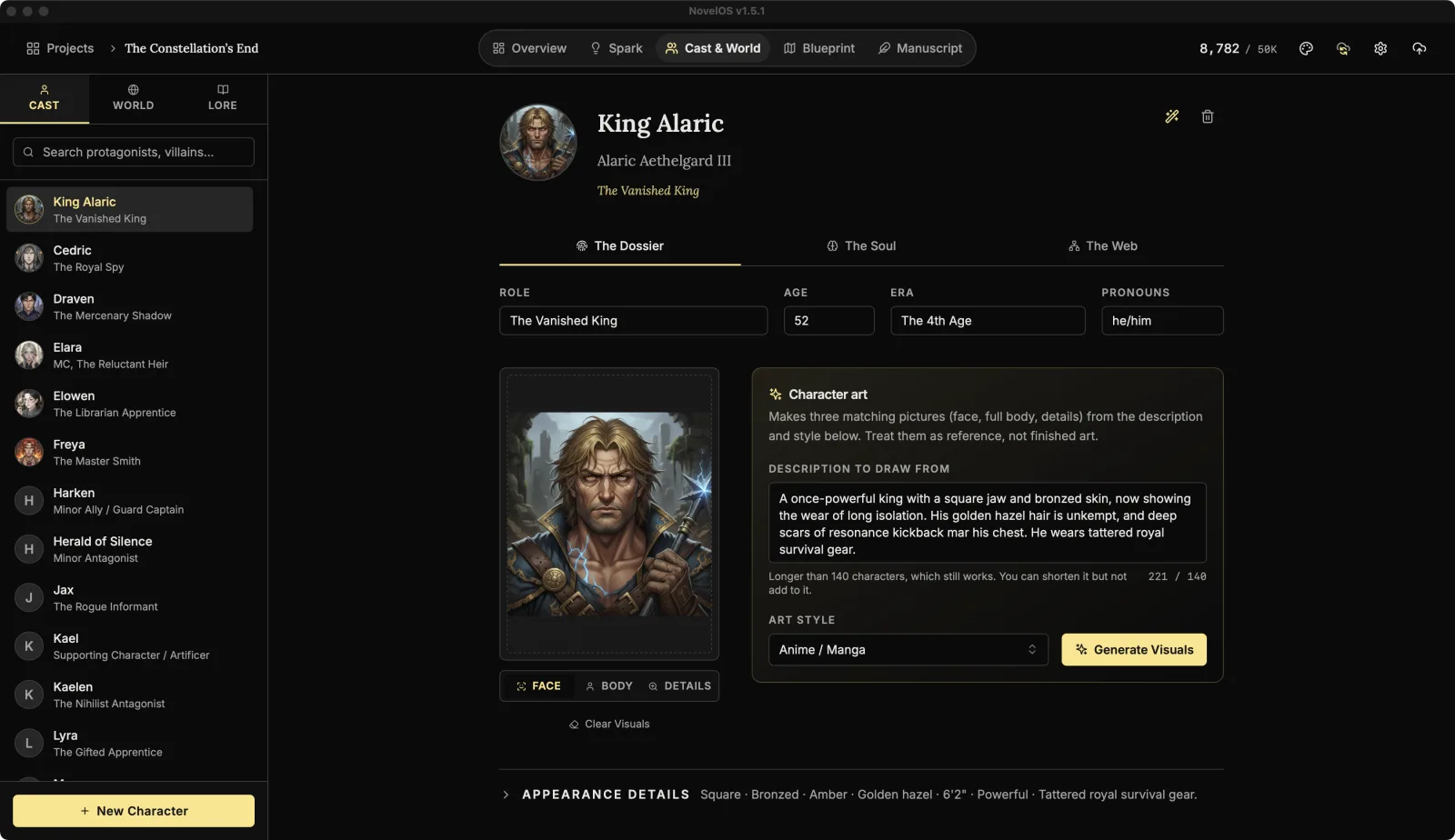
The cast list
- New Character at the bottom adds one, called "Untitled Character" until you name them. ⌥ ⌘ C (Ctrl Alt C on Windows) does the same from anywhere in the book.
- Search protagonists, villains... filters the list.
- Each character shows their role underneath, or "Unclassified" if they don't have one.
With nobody selected, the page says "Select an entry or create a new one."
The header
At the top of a character:
- The portrait. Hover it for Upload New. Once there's a portrait, hover also shows Zoom View (the picture full size, with a download button) and Clear (removes the portrait).
- Display Name / Nickname: what the book calls them, and the name in lists.
- Full Legal Name: the whole thing, titles and all.
- Narrative Function (e.g. Anti-Hero, Foil): their job in the story, in a word or two.
- Delete, the bin on the right, asks once more with a tick before the character goes.
Below the header are three tabs: The Dossier, The Soul and The Web.
The Dossier
The facts: Role, Age, Era and Pronouns.
Character art
Character art makes three matching pictures of the character from a description: a face, a full body, and a close-up of details like fabric and props.
- Write the Description to draw from: a sentence or two in plain words. Face, hair, build, clothing, anything distinctive. There's a character limit; a description over it still works, and you can shorten it but not add to it.
- Pick an Art style. The suggestions are Realistic, Cinematic 3D, Anime / Manga, Digital Art, Oil Painting, Concept Art, Charcoal Sketch, Cyberpunk, Fantasy Illustration and Watercolor, or type your own.
- Click Generate Visuals. It draws the face first, then the body, then the details.
The face becomes the character's portrait. Switch between the pictures with FACE, BODY and DETAILS; hover one for Full View. Clear Visuals removes all three (and the portrait too, if the portrait was the generated face; a portrait you uploaded stays).
It needs a Muse key, a name, and at least a role, a face shape or a hair colour. Treat the results as reference, not finished art. The app says so too.
Appearance details
Click Appearance details to open the rest of the look: Face shape, Skin Tone, Eye Color, Hair, Height, Build, Clothing and Distinguishing marks. Most have a list of suggestions, and all of them take whatever you type.
The Soul
Who they are on the inside.
- Short description: the core concept in a line or two.
- Archetype, Moral Alignment and Voice.
- Wants (the external goal) and Fears (the internal trauma).
- Biography: backstory, defining moments and current arc, in the full editor with its formatting toolbar.
Each list suggests options, and you can type your own instead:
| Field | Suggestions |
|---|---|
| Archetype | The Hero (Warrior), The Mentor (Sage), The Everyman (Orphan), The Innocent, The Explorer (Seeker), The Rebel (Outlaw), The Creator, The Ruler, The Magician, The Caregiver, The Jester, The Lover |
| Moral Alignment | Lawful Good, Neutral Good, Chaotic Good, Lawful Neutral, True Neutral, Chaotic Neutral, Lawful Evil, Neutral Evil, Chaotic Evil |
| Voice | Baritone, Tenor, Alto, Soprano, Gravelly, Breathless, Nasal, Melodic, Monotone, Staccato, Drawling, Whispery, Booming |
| Wants | Survival, Love/Belonging, Power/Control, Freedom, Truth/Knowledge, Revenge, Redemption, Justice, Creation/Legacy, Order |
| Fears | Death, Failure, Abandonment, Chaos/Loss of Control, Significance/Mediocrity, Exposure/Vulnerability, Betrayal |
The Web
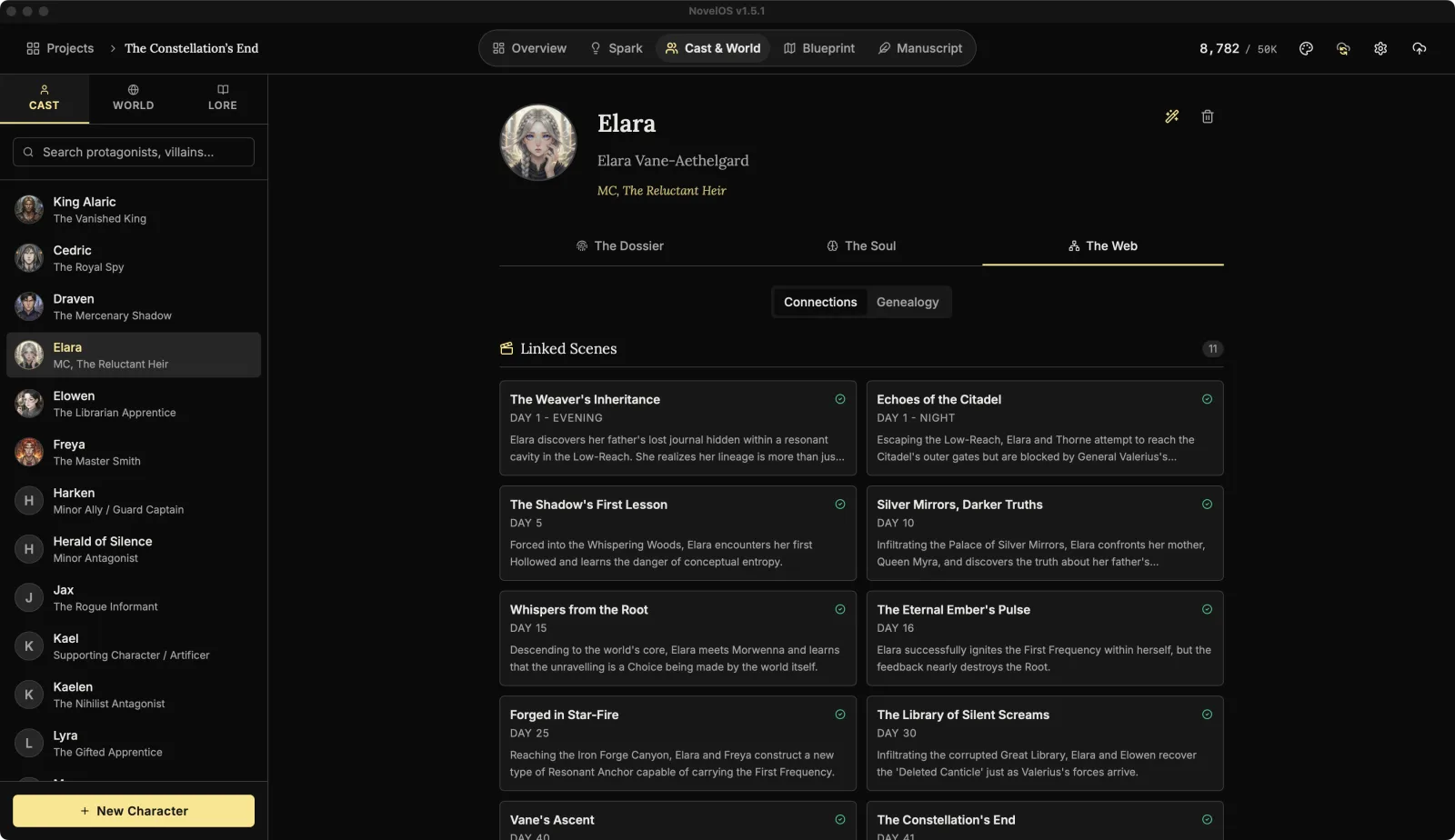
Two views: Connections and Genealogy. Genealogy is the family tree, and has its own page.
Connections gathers everything the character touches:
- Linked Scenes: every scene in Blueprint the character is tagged in, with its status, story time and synopsis. Click one to open it.
- Locations & Items: places, things and lore linked to this character. Add Link opens Select to Link, where you search and pick. Hover a link made here and click Unlink to remove it. Links made from the other side (a place that lists this character, say) show here too, and are removed from that side. Click any card to jump to it.
- Appearances in Manuscript: every chapter that mentions the character, with its number and word count. Click one to open the chapter. Nothing shows until you mention them in a chapter.
Let The Oracle invent a character
The Oracle (AI Generator) is the sparkle button at the top right of a character. It only appears once you've added a Muse key.
- Pick an ORIGIN / CULTURE from the list of countries, or leave it on Any....
- Describe who you're after under CONTEXT / DETAILS: "a weary soldier returning home", "a noble with a dark secret".
- Click Generate Concepts. The Oracle also reads your book's genre, synopsis, cast and world, so the results fit.
A window of results opens. Each one has a name, role, age, pronouns, era, what they want, a description and their looks. Pick one and click Use This Character to fill in the open character, or Regenerate for another batch. Everything it fills in can be edited afterwards. It writes over the fields it fills and empties Fears, Moral Alignment and Voice, so use it on a new character or one you're happy to rewrite.
Related
Checked against NovelOS Studio 1.5.1 · Updated · View as Markdown